App: ShieldMyTeen

As a parent, your options are very limited in respect to child-proofing the untamable beast that the internet is, especially if the services of a parental control apps are not availed. With the World Wide Web serving as an ocean filled with boundless information, allowing your teens to plunge into it through cell phones and tablets seems to be the right thing to do. But should they be allowed to explore the inhibited cyber space freely and excessively? What about the plethora of bad content ranging from pornography and hate speech to violence and other potentially dangerous content that is freely floating in the digital environment? Impressionable and curious, kids find it hard to resist the temptation to visit websites and view content detrimental to their mental and even physical development.With the advent of smart mobile devices and their growing prevalence in kids, it has become more vital than ever to address this risk. So what can you really do about it? You of course can shield them from the harmful and addictive content on the internet. But how do you do that exactly?
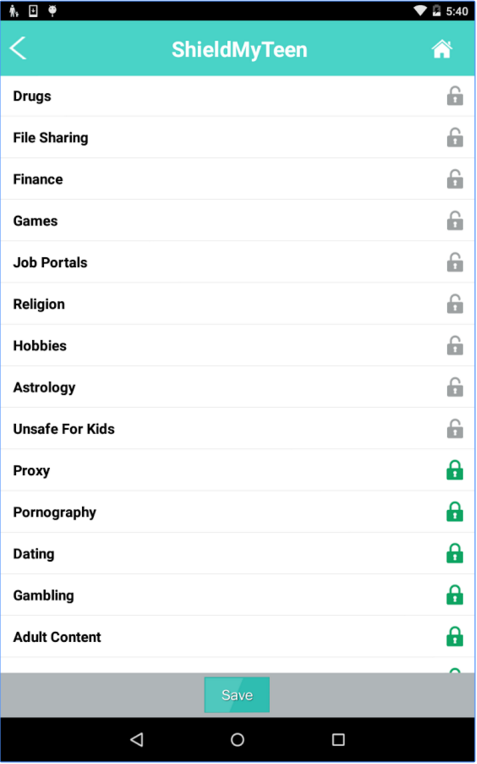
ShieldMyTeen parental control app (Android) is a web filtering tool that is designed to filter out harmful content and block any potentially dangerous websites,and time wasting websites, thus ensuring a safe internet surfing experience for your teens. It uses a smart category-based system to scan, identify and classify millions of websites and billion of web pages into categories that you can allow or block on your kids’ mobile devices. Completely wiping out all harmful and inappropriate content from your youngsters’ online access allows you to shield your teens from the negative influence of internet.
What’s great about ShieldMyTeen is that it takes simplicity and convenience to a whole new level so that you can start availing the service right away. All you need to do is install the parental control app on your teen’s mobile device, register an account, create a user profile for your kid or kids, and then allow or block categories using a set of simple and extremely user-friendly controls. Setting up an admin password allows you to ensure that your teens don’t tinker with the settings while your back is turned, thus making the filtering tool dependable.
Features:
— Blocks porn, crime, gambling, drugs, alcohol, crime, and many other categories of inappropriate websites
— Restricts access to social media and other time wasting websites
— Can create multiple profiles on a single device
— Quick installation and user-friendly interface
— Password-protected access to ensure reliability
You can safely rely on ShieldMyTeen to filter out all that is wrong with the internet, leaving behind only the good stuff for your teens to explore.
Sources: ShieldMyTeen
Questions about this article
What is ShieldMyTeen?
ShieldMyTeen is a parental control app for Android that filters web content on a teenager’s phone or tablet. Parents can block categories of websites they consider harmful or time-wasting.
How do parents set up ShieldMyTeen?
They install the app on the teen’s device, register an account, create a profile for each child and allow or block categories. An admin password stops teens from changing the settings.
What kinds of websites can ShieldMyTeen block?
According to the article it can block categories such as pornography, crime, gambling, drugs and alcohol, and restrict access to social media and other time-wasting websites.
Questions and answers added in 2026, based on the article above.