App: Kitestring
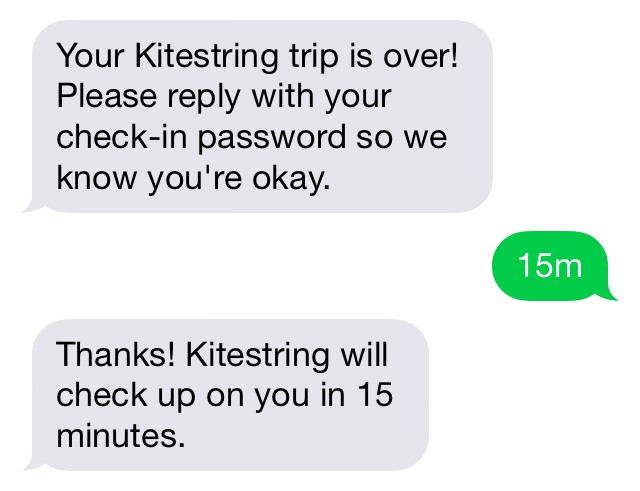
Kitestring is a “safecall service” that checks up on users when they are in a potentially uncomfortable situation (i.e. walking at night, on a blind date, etc.).
Users tell kitestring where they are going and the expected duration of the trip. When the time amount the user has given Kitestring is up, the app will send a check-in text to the user, which users simply reply to. If the user hasn’t replied to the app in the estimated time of arrival, the app will alert the set emergency contacts something could be wrong. Users can notify Kitestring if they are running late. Users without smartphones can sign up for Kitestring online, and use the service the same way a smartphone would be able to.
Kitestring does one thing: it checks up on you. Like a virtual overprotective mom. You don’t need to download anything to use Kitestring. A quick text message is all it takes. How it works Send Kitestring a quick text message with a time frame. For example, 45m or 3 hours. Kitestring will check up on you as promised, also via text message. Reply ok and you’re all set. If Kitestring doesn’t hear back from you, it texts your friends, your mom, or whomever you like.
Everything is in your control – you can specify exactly what the alert message says and who gets it. You can ask Kitestring to check up on you any time in the future. You can check in early, or tell Kitestring that you want more time. Kitestring can even pretend to be your mom. It has some extra features for added safety. For example, you can set up a check-in password so that the bad guys can’t check in on your behalf. You can also specify a duress code, which looks like a check-in password but is secretly a call for help.
There are other personal safety apps and services, such as bSafe, Watch Over Me, and Circle of 6. So why a new one?
- Most people don’t use personal safety apps. Kitestring believes it’s because they are too inconvenient. Kitestring is as easy as cherry pie.
- Most of these apps are triggered by some action like pushing a big red button or shaking one’s phone. Alot of bad situations do not afford a victim the opportunity to take these actions. Kitestring is a little different – it’s triggered by the victim’s inaction.
- Many of these apps are not free – after all, their creators need to eat. But any price tag, no matter how small, is enough to deter most people. Kitestring is free so everyone can use it.
It also resembles the Guardian app:
This video is no longer available.

Questions about this article
How does Kitestring work?
You send Kitestring a text with a time frame, for example 45m. When the time is up it texts you to check in; if you do not reply, it sends an alert to the contacts you have chosen.
What is a duress code in Kitestring?
A code that looks like a normal check-in password but is secretly a call for help. A separate check-in password prevents others from checking in on your behalf.
How is Kitestring different from other personal safety apps?
According to Kitestring, most safety apps require an action such as pushing a button or shaking the phone, while Kitestring is triggered by inaction. It also needs no app download and is free.
Questions and answers added in 2026, based on the article above.